AI Image Maker: A Complete Guide to Creating Images With Artificial Intelligence
Creating high-quality images used to require professional design software, photography equipment, or advanced artistic skills. Today, technology has changed that process dramatically. An AI image maker can help people create original images from simple text descriptions, making visual content faster and more accessible than ever.
Whether you are a blogger, marketer, business owner, student, social media creator, or simply someone who enjoys experimenting with digital art, an AI image maker can become a useful creative tool. Instead of spending hours designing an image from scratch, users can describe what they want and let artificial intelligence generate a visual concept.
What Is an AI Image Maker?
An AI image maker is a software tool that uses artificial intelligence to create images based on user instructions. In many cases, the user enters a text prompt describing the desired image. The system then analyzes the words and produces an image that attempts to match the description.
For example, someone might enter a prompt such as:
“Create a peaceful mountain village at sunrise with wooden houses, green hills, soft morning fog, and warm natural lighting.”
The AI can interpret those details and generate a visual representation of the scene.
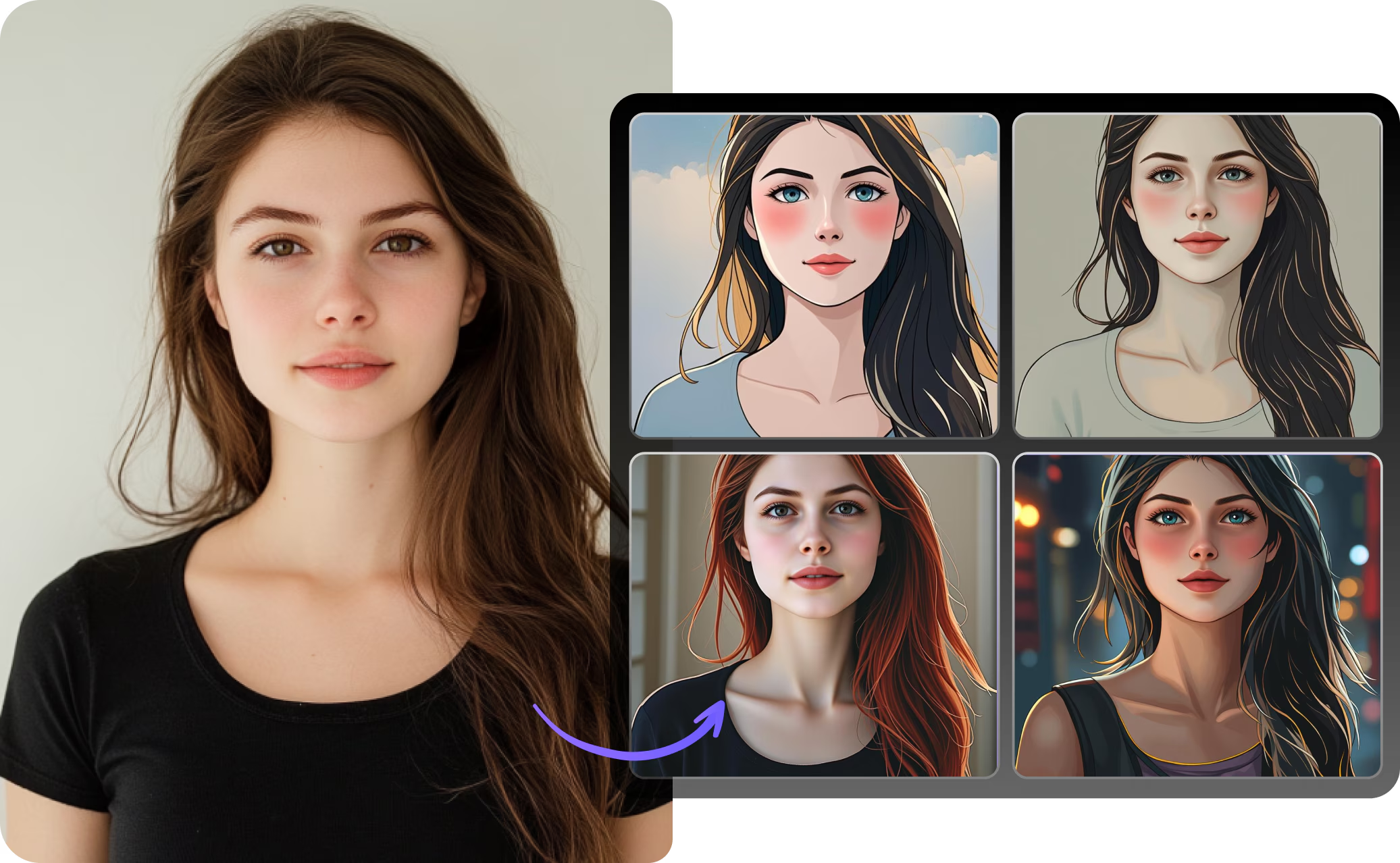
Modern image-generation systems can create many different types of content. Depending on the platform, users may generate realistic photographs, illustrations, digital artwork, posters, product concepts, backgrounds, characters, landscapes, and other visual compositions.
The main advantage is accessibility. A person does not necessarily need advanced knowledge of Photoshop, illustration, photography, or graphic design to begin creating images.
How Does an AI Image Maker Work?
Behind an AI image maker are sophisticated machine-learning models trained to understand relationships between words and visual patterns. These systems learn from large collections of visual information and associated descriptions during their development.
When a user submits a prompt, the system processes the language and identifies important details. These can include objects, colors, environments, actions, composition, lighting, mood, and artistic characteristics.
The model then generates an image based on its interpretation of those instructions.
The process may look simple from the user’s perspective, but there is considerable technology working behind the scenes. The system needs to understand both the meaning of the prompt and how different visual elements can be combined into a coherent composition.
This is why prompt writing can have a significant effect on the final result.
Why Are AI Image Makers Becoming Popular?
One major reason for the popularity of AI image makers is speed. Traditional image production can require considerable time, especially when a project involves several revisions. AI tools can produce initial concepts within a short period.
Another advantage is experimentation. Users can test different ideas without starting every design from the beginning.
For example, a small business owner might need several social media concepts for a new product. Instead of commissioning a separate illustration for every idea, the owner can use AI-generated concepts to explore different visual directions.
AI image makers are also useful for people who have creative ideas but limited technical skills. Someone may know exactly what they want an image to communicate without knowing how to draw or design it manually.
Common Uses of an AI Image Maker
An AI image maker can be useful across many industries and personal projects.
1. Social Media Content
Social media platforms depend heavily on visual content. Eye-catching images can help posts communicate ideas quickly.
Creators can use AI-generated visuals for backgrounds, concepts, promotional graphics, storytelling, and creative posts. A travel creator, for instance, might create imaginative destination artwork to accompany an article or video.
2. Blogging and Website Design
Bloggers often need original visual material to make articles more engaging. An AI image maker can help create illustrations that match the subject of an article.
For example, a technology blog could generate a futuristic computer illustration, while a cooking website might need an artistic kitchen scene.
However, creators should always understand the licensing and usage terms of the particular AI service they use.
3. Marketing and Advertising
Marketing teams constantly need new visual concepts. AI tools can help with brainstorming advertisements, campaign ideas, product scenes, and promotional artwork.
Instead of immediately producing a final advertisement, a marketer can first create several visual concepts and determine which direction fits the campaign.
4. Product Visualization
Entrepreneurs can use AI image generation to visualize product ideas before investing in photography or physical prototypes.
For example, someone developing a new furniture concept might generate different room settings to explore how the product could look in various environments.
These images may be useful during brainstorming, presentations, and early-stage planning.
5. Education
Teachers and students can also use AI-generated images for educational projects. Visual explanations can make complicated concepts easier to understand.
Students might create historical scene illustrations, science-related visuals, fictional environments, or presentation graphics.
The important point is that AI-generated content should complement learning rather than replace research and critical thinking.
How to Write Better Prompts
The quality of an AI-generated image often depends on how clearly the user explains the desired result.
A vague prompt such as “a beautiful city” leaves many details open to interpretation. A more specific prompt can provide the AI with additional guidance.
For example:
“Create a modern city skyline at sunset, viewed from a rooftop, with glass skyscrapers, warm orange light, light clouds, and a realistic photographic appearance.”
This prompt provides information about the subject, location, time, perspective, lighting, and visual style.
Useful prompt elements can include:
- Main subject
- Environment
- Lighting
- Colors
- Camera perspective
- Composition
- Mood
- Artistic style
- Level of realism
- Important objects or details
You do not always need a very long prompt. Clear and relevant information is generally more useful than filling the prompt with unnecessary words.
Realistic Images and Creative Artwork
One interesting feature of AI image makers is their ability to produce different visual styles.
A user can request a realistic-looking scene, a hand-drawn illustration, a watercolor-style composition, a cartoon-inspired image, or a futuristic digital artwork.
This flexibility makes AI image generation useful for both practical and creative purposes.
For example, a novelist could use AI to visualize a fictional environment while developing a story. A designer could use it to explore visual directions. A student could use it to create a presentation illustration.
The same basic technology can support very different creative goals.
Benefits of Using an AI Image Maker
There are several potential benefits to using AI image-generation tools.
Faster Creative Work
AI can produce concepts quickly, allowing users to move from an idea to a visual draft without spending hours creating everything manually.
Easy Experimentation
Users can try different prompts and approaches. This encourages experimentation because changing an idea does not necessarily require rebuilding an entire design from scratch.
Lower Barrier to Entry
Traditional graphic design can have a steep learning curve. AI image tools provide another way for beginners to explore visual creation.
Idea Development
Even when an AI-generated image is not used as the final product, it can help users visualize an idea and communicate it to others.
Wide Creative Range
AI systems can generate numerous types of images, making them useful for different personal and professional projects.
Limitations of AI Image Makers
Despite their capabilities, AI image makers are not perfect.
Generated images can sometimes contain strange details, inaccurate objects, inconsistent proportions, or other visual problems. Text inside generated images can also be unreliable depending on the tool and generation method.
Another challenge is interpretation. An AI may understand a prompt differently from what the user intended. As a result, users may need to adjust their descriptions and generate multiple versions.
There are also important questions surrounding copyright, licensing, privacy, and the use of training data. These issues can vary depending on the AI service, jurisdiction, and intended use.
For commercial projects, users should carefully review the specific platform’s terms before publishing or selling AI-generated material.
AI Image Maker vs. Traditional Design
AI image generation and traditional design do not necessarily need to compete with each other.
Traditional design provides detailed control and allows professionals to manually adjust individual elements. AI tools can be particularly useful for generating ideas, creating drafts, and exploring possibilities quickly.
A designer may therefore use AI as part of a larger creative workflow. The AI can provide an initial concept, while the designer edits, refines, combines, or recreates elements using conventional software.
This approach can combine automation with human creativity.
Tips for Getting Better Results
If you are new to AI image generation, start with simple prompts. Once you understand how the tool responds, gradually add more details.
It can also help to change one element at a time. If an image is almost correct but the lighting is wrong, modify the lighting rather than completely rewriting the prompt.
Keep important requirements near the center of your description and avoid unnecessary contradictions.
Most importantly, treat the first generated image as a starting point. Good results often come through experimentation and refinement.
Responsible Use of AI-Generated Images
Responsible use is an important part of working with artificial intelligence.
Users should avoid creating misleading material intended to deceive people. Special care is also necessary when generating images involving real people, sensitive subjects, or situations that could cause harm.
Businesses should check whether generated content complies with advertising standards, platform rules, copyright requirements, and applicable laws.
It is also useful to maintain transparency when the context makes disclosure appropriate. The exact expectations can differ between industries and platforms.
The Future of AI Image Creation
ai image maker technology continues to develop rapidly. Future tools may provide greater control over composition, characters, environments, editing, animation, and consistency across multiple images.
Instead of simply generating a single picture from text, AI systems may increasingly become complete creative assistants. Users could describe an entire visual campaign and then refine each component through natural-language instructions.
This could make visual creation even more accessible while also increasing the importance of human judgment.
The role of people is unlikely to disappear from the creative process. Ideas, context, taste, storytelling, ethical decisions, and final approval still require human involvement.
Conclusion
An AI image maker provides a convenient way to transform ideas into visual content. By using artificial intelligence, people can experiment with realistic scenes, illustrations, concepts, backgrounds, marketing visuals, and many other forms of digital artwork.
The technology is especially valuable because it reduces some of the technical barriers traditionally associated with image creation. Beginners can explore visual creativity, while experienced designers can use AI for brainstorming and rapid concept development.
At the same time, AI image generation has limitations. Users should review generated images carefully, understand the terms of the tool they are using, and consider copyright, privacy, accuracy, and responsible-use issues.
Ultimately, an AI image maker is most useful when treated as a creative assistant rather than a replacement for human judgment. With clear prompts, thoughtful experimentation, and careful editing, it can become a powerful part of a modern visual-content workflow.